**Main Menu** *- Don't be confused about "*Mobility Hub*", you won't find this feature* in your mod version yet *- it is in the* early development phase.
--- ### Selecting an Intersection 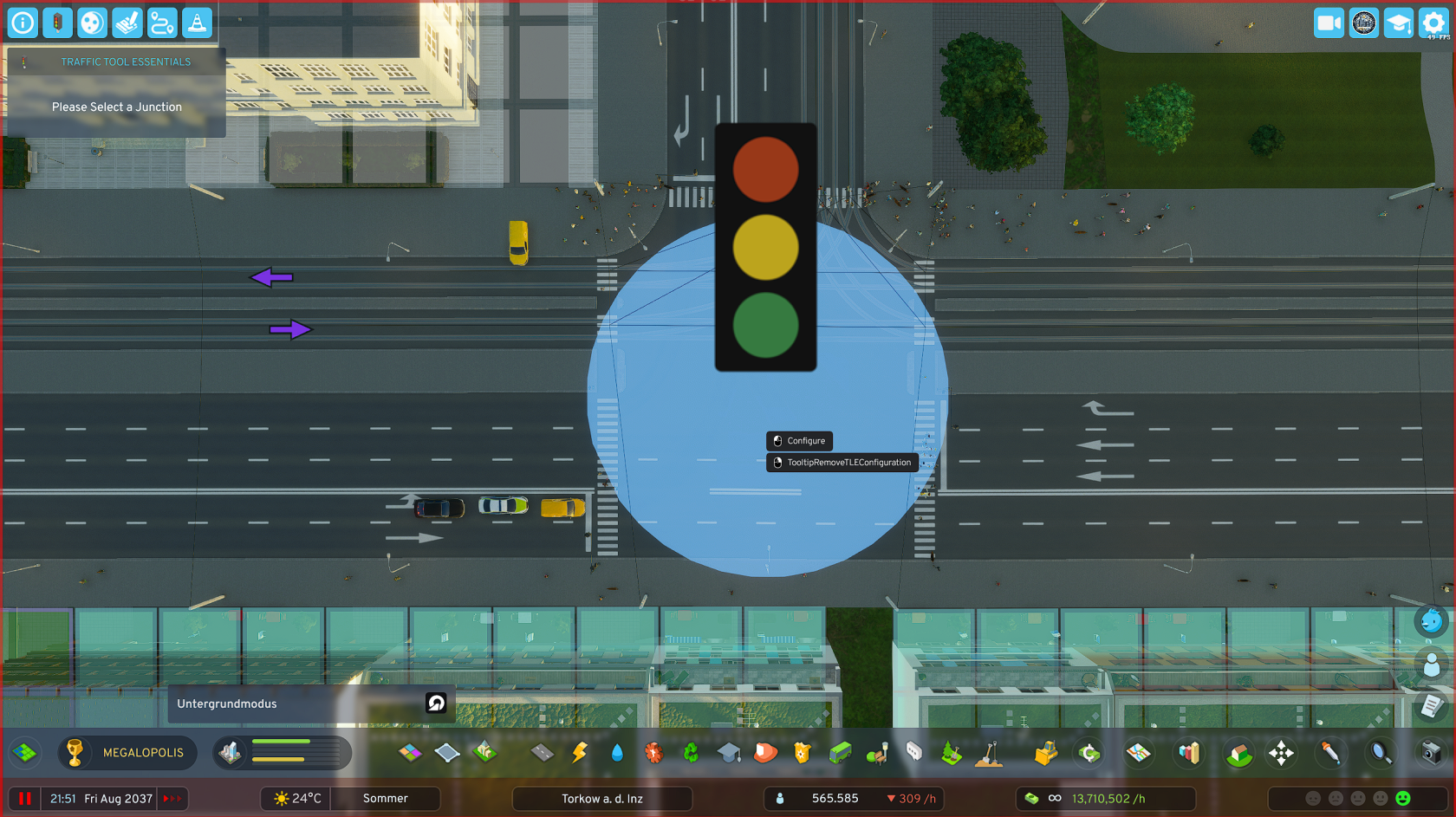 - Select "**Edit intersection phases**" in the open TTE menu. - The **selection tool is now activated** and you can only click on intersections. - **ESC** to **exit** the selection tool.**Selection Tool** Hover with the selection tool over the desired intersection and click with the left mouse button. This takes you to the editor of the respective intersection.
--- ### Editing an Intersection [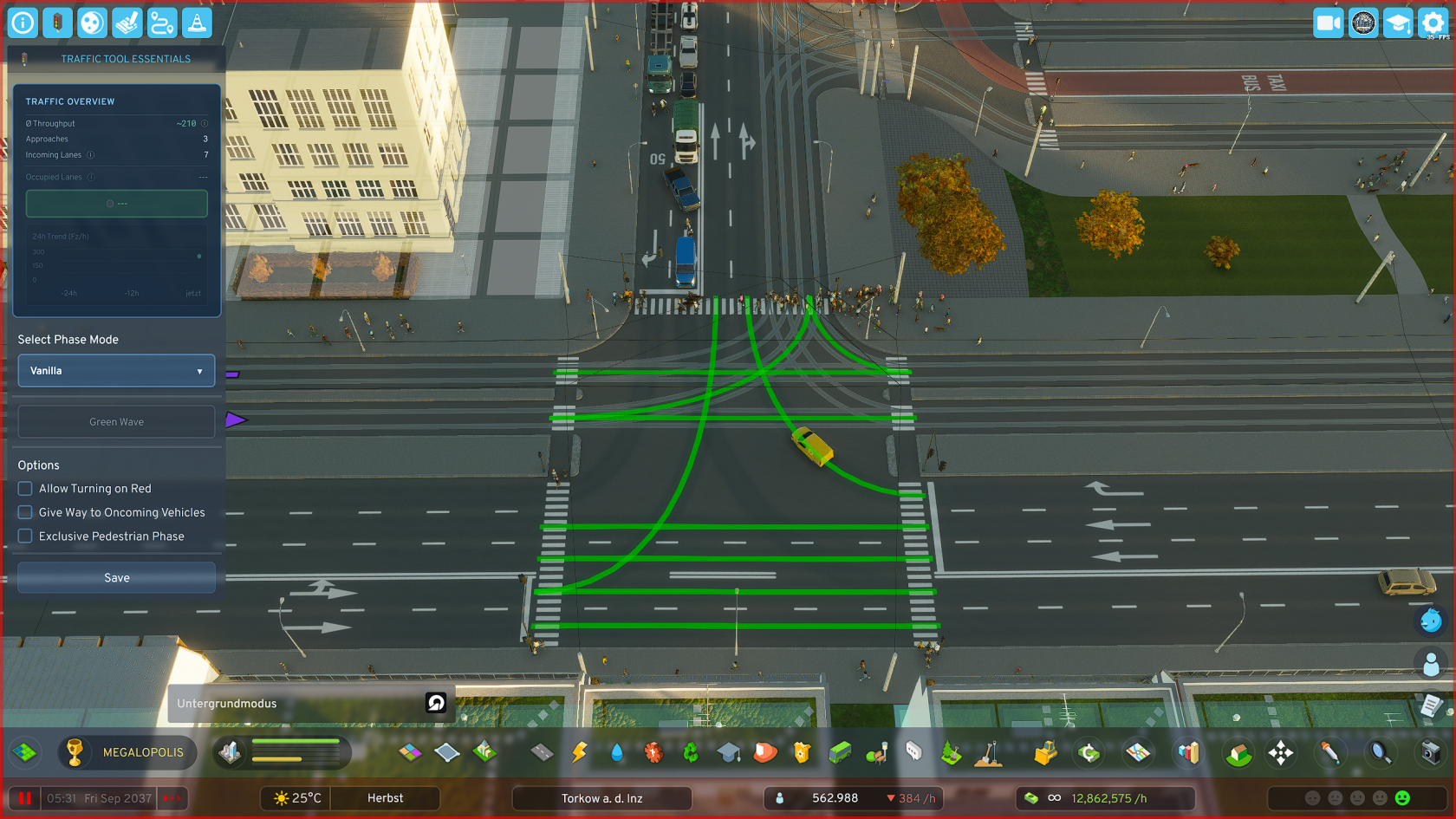](https://shelf.zessons.de/uploads/images/gallery/2025-12/AMjorhkrklwrSuDC-kreuzung-vanilla.png) Once you have **clicked on an intersection**, you go directly to the **editor** of the respective intersection. There are predefined **quick-select phase templates**, such as "Split Phase", or "Extended Split Phase".**Intersection Editor** - In the editor you have an immediate rough overview of your selected intersection's data - You have **additional options**, e.g. **"Turn on red"** or "**Exclusive pedestrian phase**", to better adapt your intersection to local conditions
# Predefined Settings # Predefined Settings ### Predefined Modes The mod comes with several predefined modes that can be sufficient in some situations to significantly improve intersection performance. These include the following - and what they do: - **Vanilla:** Straight/turning protected, one turning side grants priority (LHT: Right turners / RHT: Left turners) - **Split Phase:** Only one road approaching the intersection has green at a time - **Extended Split Phase:** Like Split Phase, but additionally with protected turning lanes for the cross street - **Protected Left/Right Turn:** First the turning lane switches (LHT: Left / RHT: Right), then the regular traffic flow for straight/opposite direction followsFor advanced **details** and **real vehicle counting, occupied lanes, waiting vehicles, etc.** a **custom phase cycle** is required For **complicated intersections** it is always recommended to design **custom phase cycles** to experience the **best performance** and most fun with the mod's features
--- ### Predefined Options The mod comes with several predefined options with which you can extend the predefined modes, which can again significantly improve intersection performance. These include the following - and what they do: - **Allow Turn on Red:** Allows turning (LHT: Left / RHT: Right) despite a red light - **Yield to Oncoming Vehicles (Vanilla only):** Vehicles must watch for oncoming traffic when turning (High traffic volume can reduce effectiveness when drivers aggressively "push through") - **Exclusive Pedestrian Phase:** All vehicles stop; a dedicated phase only for pedestrians becomes active - **Pedestrian Phase Duration:** Sets the green phase for pedestrians. - *Note: Only active with "Exclusive Pedestrian Phase". The traffic lights are not "smart" and do not extend automatically***Parameter Description** **- Minimum Duration:** The phase must run at least this long, completely independent of whether there is high or low traffic on it **- Maximum Duration:** The phase may be active for at most this long (e.g., to actively reduce phase duration on lower-traffic arms to favor main traffic directions) **- Target Duration:** Influences (as one of two factors) the duration of the green phase. 2x = twice as long, etc. **- Lane Occupancy:** Influences (as the second of two factors) the duration of the green phase, but target-controlled, not in principle like target duration, but ONLY when the lane is actually occupied by vehicles **- Interval Exponent:** Vehicles and phases that would have to wait a long time are favored in Priority Mode to prevent them from "starving". However, this can be handled more elegantly with the more modern variant (Sequential Mode)
# Custom Phase Cycles ### Opening the Phase Editor Base Menu (PBM) 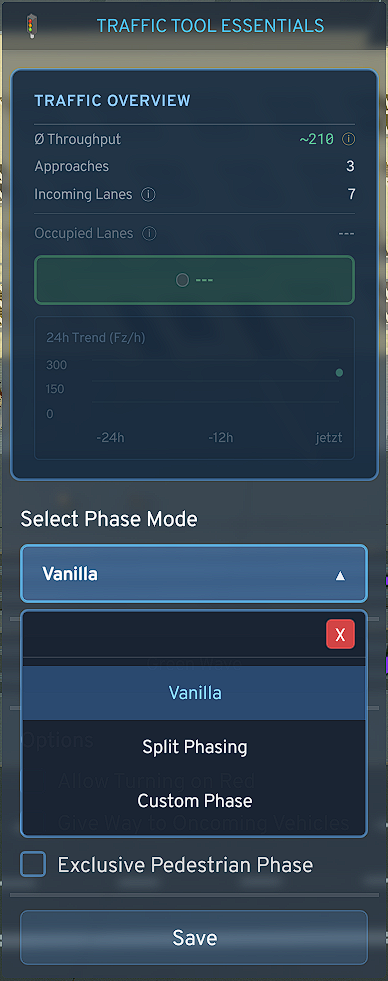 - In the **dropdown menu**, set the **phase mode** to "**Custom Phase**" - Then click on "**Program custom phases**" - The **base menu** of the Phase Editor **opens** - Here you can also **change the method** by which **phases are switched** - **Priority (*Default*)**, Switches based on current traffic volume - **Sequential (*TTE Mode*)**, switches through phases in order [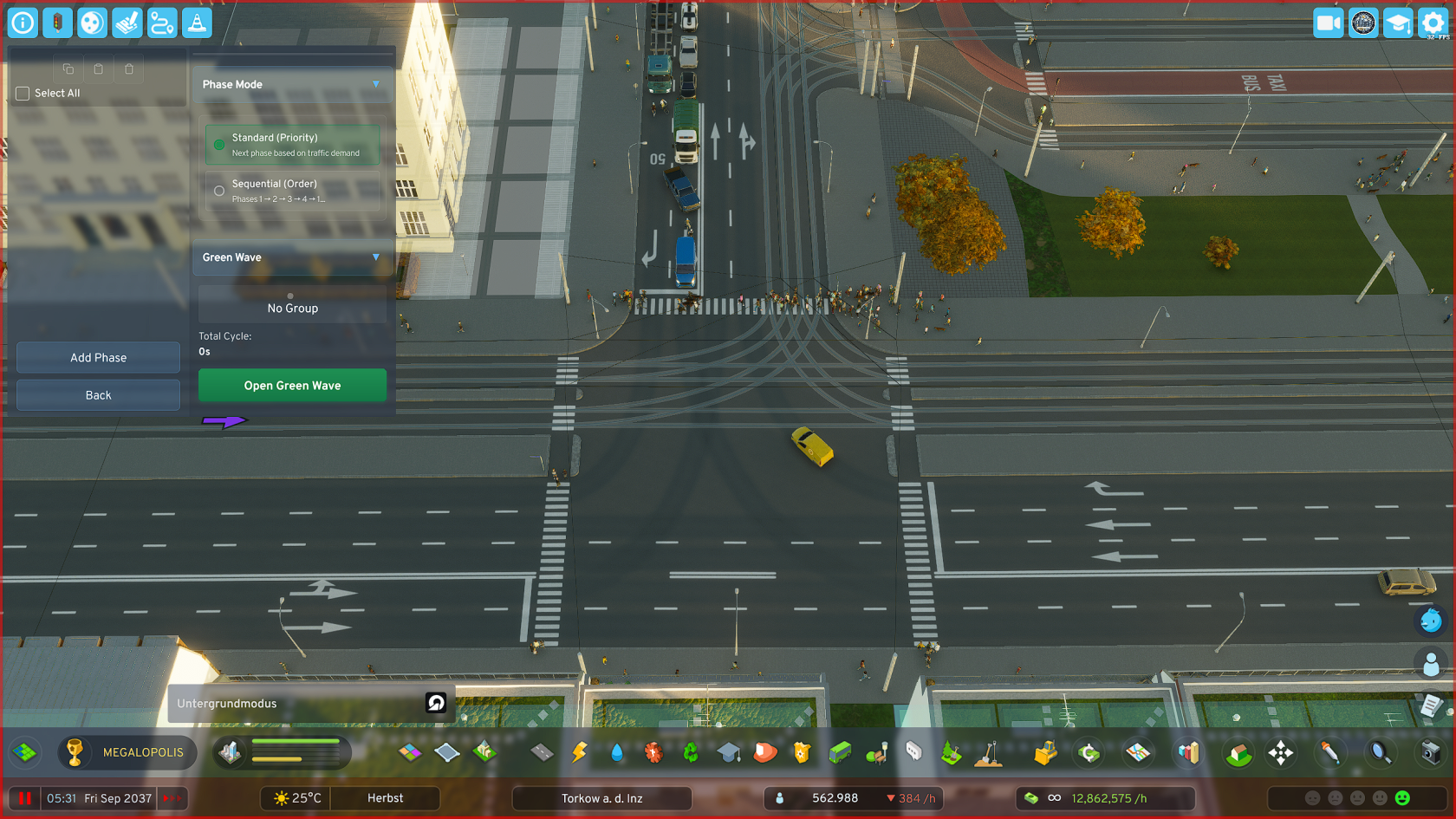](https://shelf.zessons.de/uploads/images/gallery/2026-01/Ik4wGppxX9OGTCdm-i0zgirzagxmfdwdx-ivv0fyvitqkprojh-phaseeditor-standard.png)**Phase Editor (Base Menu)** Here you can manage your phases: **Create** phases, **move** phases, **edit** phases, **delete** phases, **copy** phases and **paste** phases
--- ### Adding a Phase 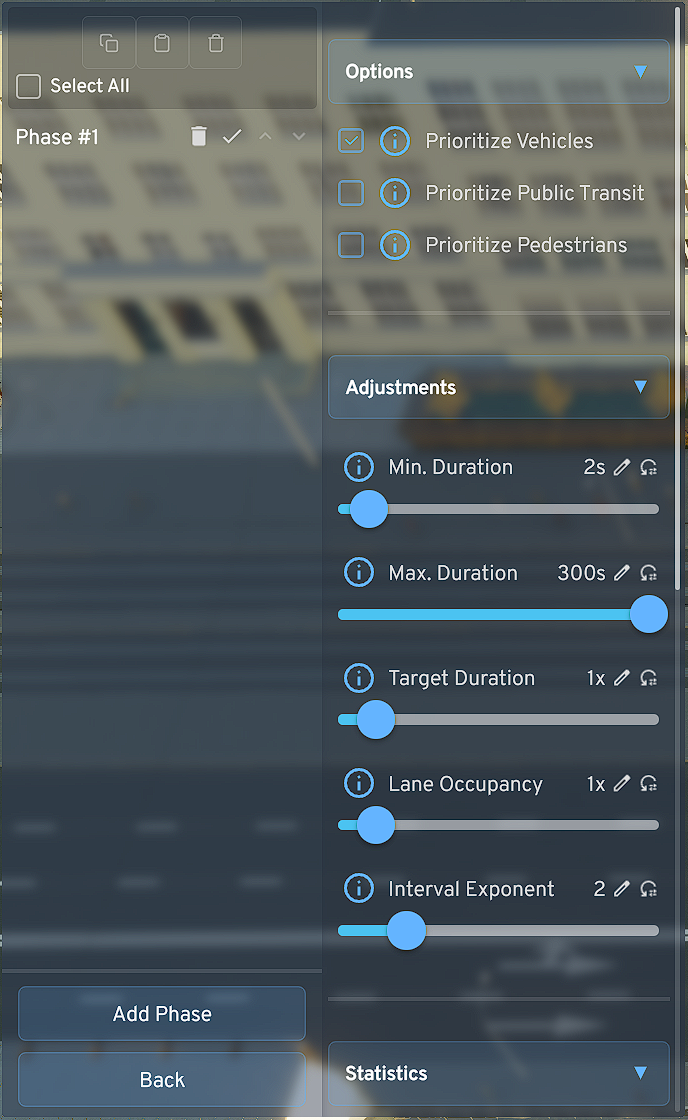 - Click on "**Add Phase**", the phase menu opens immediately - Set the **parameters of the respective phase** according to your preferences and local requirements - Also set here **which road users** should be **prioritized** in a phase. For example, if a tram and individual traffic lane cross in a phase and you have set to prioritize public transit, traffic waits until the tram has passed the intersection [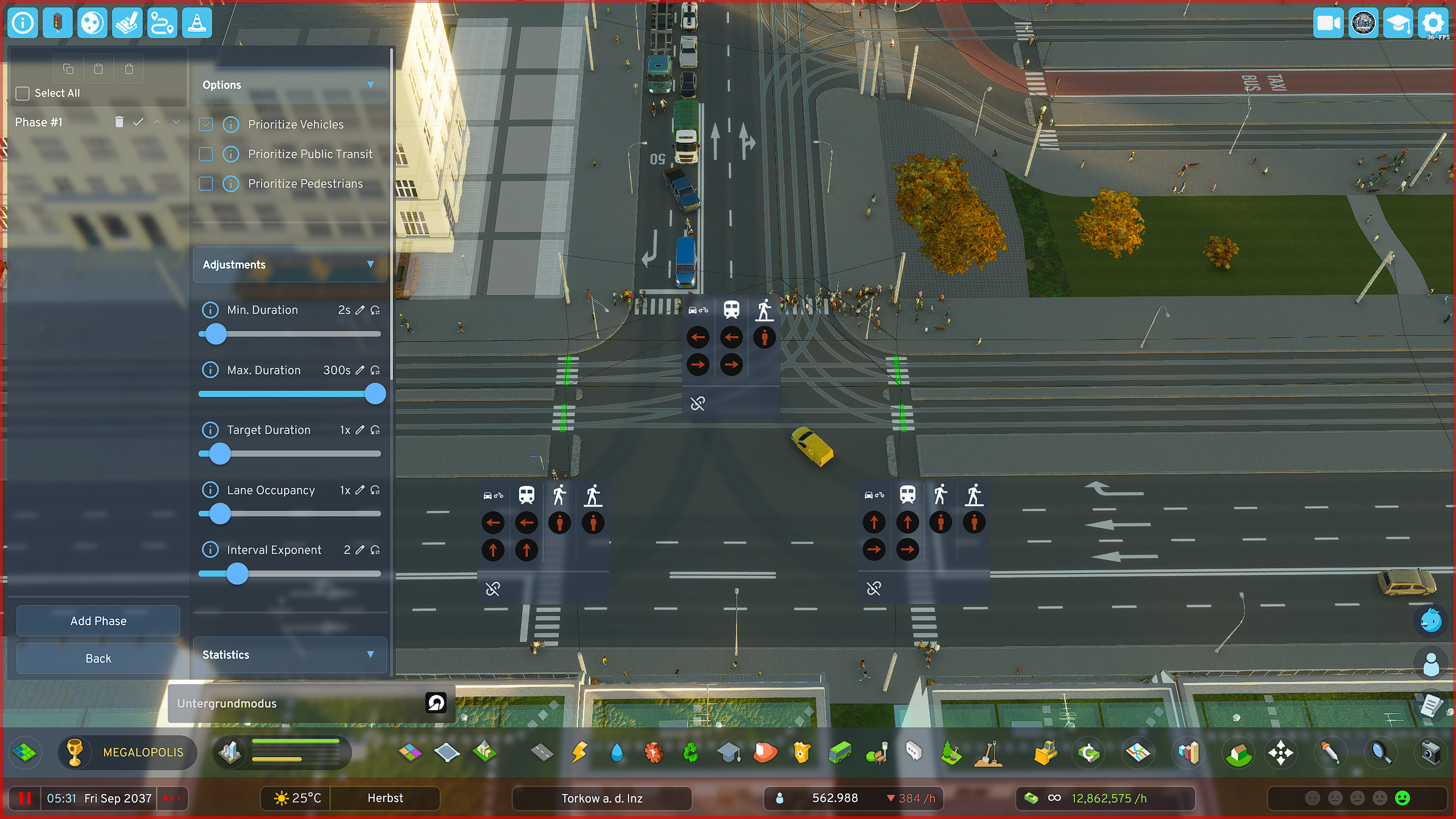](https://shelf.zessons.de/uploads/images/gallery/2025-12/Yl2pjNWrdylUAIil-ox6ivitf5aiusoii-phaseeditor-phaseedit-phase1.png)**Parameter Description** **- Minimum Duration:** The phase must run at least this long, completely independent of whether there is high or low traffic on it **- Maximum Duration:** The phase may be active for at most this long (e.g., to actively reduce phase duration on lower-traffic arms to favor main traffic directions) **- Target Duration:** Influences (as one of two factors) the duration of the green phase. 2x = twice as long, etc. **- Lane Occupancy:** Influences (as the second of two factors) the duration of the green phase, but target-controlled, not in principle like target duration, but ONLY when the lane is actually occupied by vehicles **- Interval Exponent:** Vehicles and phases that would have to wait a long time are favored in Priority Mode to prevent them from "starving". However, this can be handled more elegantly with the more modern variant (Sequential Mode)
--- ### Setting Phase Lane Release **Create multiple phases this way and essentially create an individual heartbeat for each of your important intersections.** - **Create** as **many phases as you need** to **cover all intersection arms and turning lanes** at your respective intersection - Click on the **red icon** of the desired **road user** (cars/bicycles, public transit, pedestrians) to switch the corresponding traffic light from **red to green** - **Click again** on the same symbol and the color **changes to blue**, which means that - **Click** a **third time** to return the symbol to its **default state (RED)** [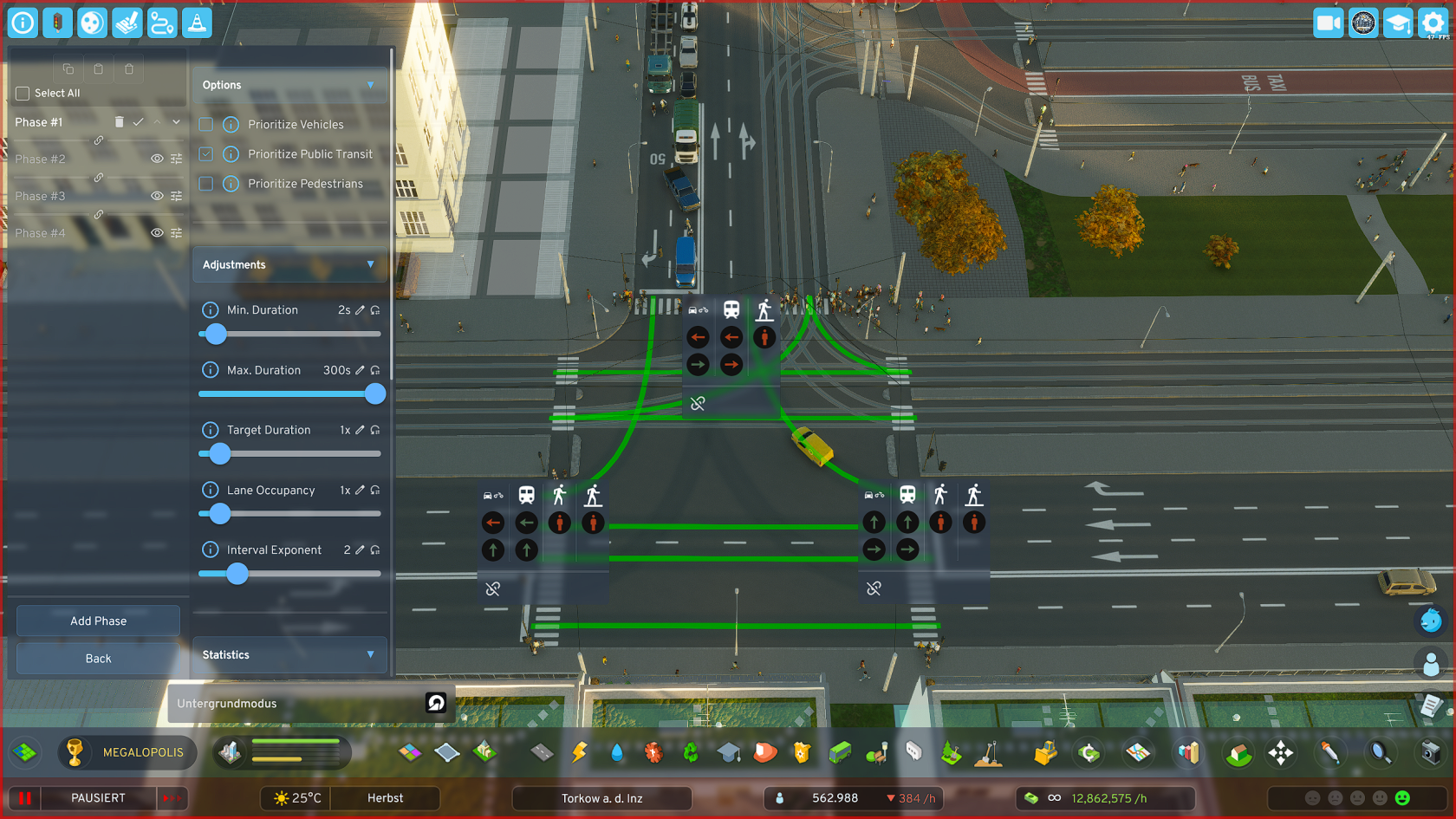](https://shelf.zessons.de/uploads/images/gallery/2026-01/LUyoCc4QZllxqT1k-yl2pjnwrdyluaiil-ox6ivitf5aiusoii-phaseeditor-phaseedit-phase1.png)**TIPS** **1.:** Create a separate pedestrian phase at intersections of major traffic arteries where many pedestrians also appear (most likely in the city center, or on later-planned major bypass roads, etc.) **2.:** ***Important for "Green Wave"***: The *last phase in the overall cycle* should (**only relevant when using the "Green Wave" function**) be an ADDITIONAL "*useful phase*" - i.e., a phase that transfers traffic on *important routes*, as the last phase is used by the sync system as a *buffer for synchronization* when overall cycle lengths of intersections in a group differ significantly or the number of phases of individual intersections differs too much.
--- ### Copying and Pasting Phases - **Click** on the **checkbox** **"Select All"** in the PBM, **top left near the 3 buttons** - **Adjust** your **selection** if needed - **Click** on the **"Copy"** button - **Switch** to the **PBM of the other intersection** to which you want to **add the phases** - **Click** on the **"Paste"** button, *the middle one of the 3 buttons* [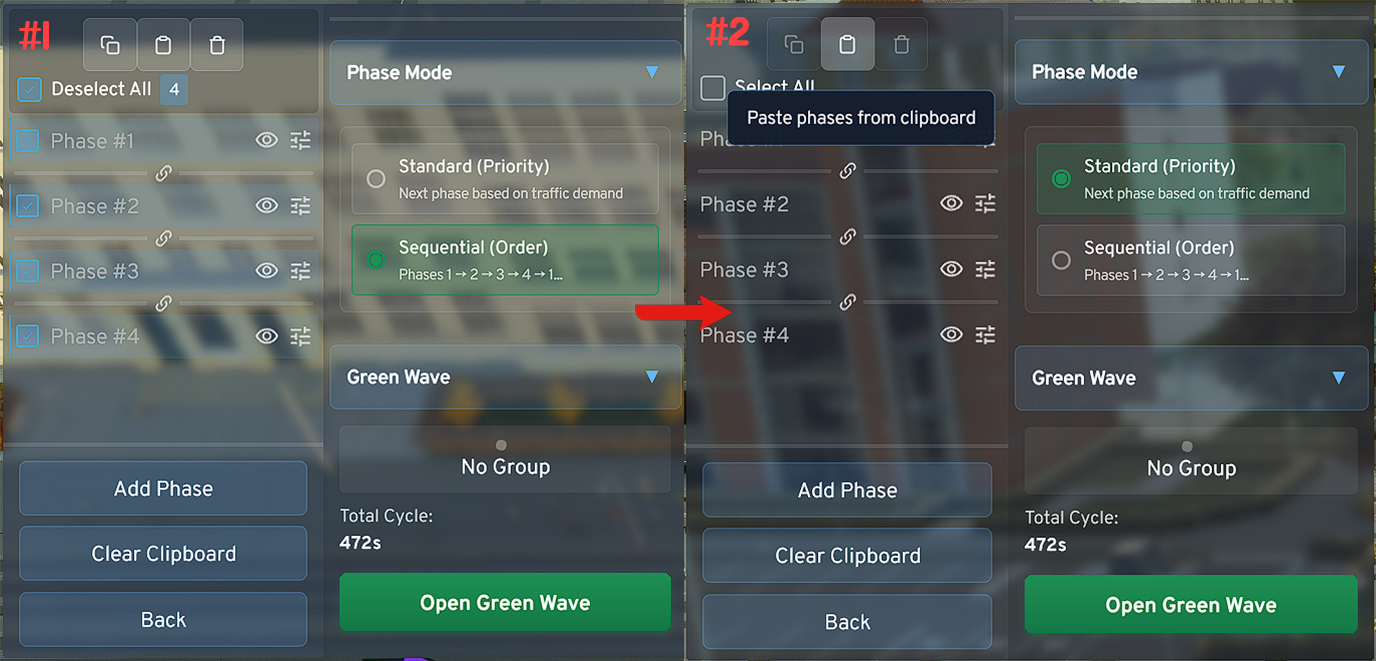](https://shelf.zessons.de/uploads/images/gallery/2026-01/EXzi2L8aw38Yum7j-phaseeditor-standard-copynpaste-complete.png)**Copy/Paste Tool** **-** The **tool cannot work magic**. For *non-identical intersections* the system will try to transfer *as many signal switches as possible* when copying, but you should *check them again* and *adjust if necessary.* **-** When synchronizing intersections, **when using the "Green Wave" function**, the system can be best optimized when grouped intersections are perfectly aligned using the tool regarding timing settings, i.e., min. duration, max. duration, etc.